
U.S. flag

An official website of the United States government

Here’s how you know

Dot gov

Official websites use .gov
A .gov website belongs to an official government organization in the United States.

HTTPS

Secure .gov websites use HTTPS
A lock (LockA locked padlock) or https:// means you’ve safely connected to the .gov website. Share sensitive information only on official, secure websites.

Freedom 250 banner logo Join HHS in Celebrating Freedom 250
    • About HHS

      HHS is a U.S. executive department that touches the lives of nearly all Americans by protecting your rights, research, food safety, health care, aging, and much more.

      Explore About HHS
    • About the Department
      • Leadership
      • HHS Divisions
      • Organizational Chart
      • Priorities
      • Budget in Brief
      • Contact Us
    • Press Room
      • Press Releases
      • Request for Comment
      • Request for Interview
      • Connect on Social Media
      • HHS Live
      • Podcasts
    • Careers
      • Working at HHS
      • Opportunities for Attorneys
      • Join the Health Workforce
      • I am HHS
      • New Employee Orientation
      • Transportation Services
    • Standards and Compliance
      • Gold Standard Science
      • Accessibility
      • Plain Writing
      • Digital Communications Standards
      • Records Management
    • Accountability and Transparency
      • Freedom of Information Act (FOIA)
      • Open Government
      • No Fear Act
      • Privacy at HHS
  • RealFood.gov
  • MAHA
    • Programs & Services

      HHS is responsible for public health, health care, and human/social services for the United States of America. This includes administering over 100 programs and services.

      Explore Programs & Services
    • Health Care
      • Find a Health Center
      • Find an Indian Health Service Facility
      • Find Support for Mental Health, Drugs, or Alcohol
      • Find a Cancer Center
      • Dental Care Options
      • Telehealth
    • Health Insurance
      • Medicare – 65+ or With Disability
      • Medicaid - Low-Income, With Disability, or Pregnant
      • Children’s Health Insurance Programs (CHIP)
      • Find Health Insurance Coverage
      • Insurance Help for Mental Health and Substance Use
      • No Surprise Medicals Bills
    • Social Services
      • Programs for Children and Families
      • Programs for People with Disabilities
      • Programs for Older Adults
      • Resources for Caregivers
    • Public Health and Prevention
      • Emergency Preparedness and Response
      • Healthy Lifestyle
      • Mental Health and Substance Use
      • Food Safety and Nutrition
      • Drug and Product Safety
    • Health Research and Information
      • National Library of Medicine
      • Surgeon General Reports
      • Health Data
      • National Center for Health Statistics
      • Medline Plus
      • Clinical Research Studies
      • Volunteering to Participate in Research
    • Laws & Regulations

      HHS protects and helps you understand the laws and regulations, also known as "rules," that govern the nation. You also have the power to voice your opinion on these laws and regulations.

      Explore Laws & Regulations
    • Regulatory Information
      • What is a Rule?
      • Find Rules by Division
      • Comment on Open Rules
      • Suggest Deregulatory Actions
      • Understand Key Federal Laws
    • Civil Rights
      • Your Civil Rights
      • Civil Rights Laws Enforced by HHS
      • Health Information Privacy
      • Substance Use Disorder Patient Confidentiality
      • Conscience and Religious Freedom
    • Laws and Regulations by Topic
      • HIPAA Privacy Rule
      • Health Insurance Protections
      • Health IT Legislation
      • Food and Drug Safety
      • Public Health Emergencies
    • Human Research Protections
      • The Belmont Report
      • Regulations, Policy, and Guidance
      • Human Subjects Regulations (45 CFR 46)
      • Register IRBs and Obtain FWAs
      • Trainings, Tutorials, and Workshops
      • International Research
    • Complaints and Appeals
      • File a Medicare Complaint
      • File a HIPAA Complaint
      • File a Civil Rights Complaint
      • Appeal an Insurance Company Decision
      • Report Fraud, Waste, and Abuse to OIG
      • Report a Problem to the FDA
      • Report a Tip on the Chemical and Surgical Mutilation of Children
    • Grants & Contracts

      HHS gives the most money in grants of any federal agency in the U.S. Find out about our grants and how your organization can apply for them. We also provide information on how you can work with us and our support of small businesses.

      Explore Grants & Contracts
    • Grants
      • Get Ready for Grants Management
      • Grant Policies and Regulations
      • Research Grants and Funding from NIH
      • Search Grants.gov
      • Avoid Grant Scams
      • Contact HHS Grant Officials
    • Contracts
      • Get Ready to Do Business with HHS
      • Programs for Businesses
      • Contract Policies and Regulations
      • Search Opportunities on SAM.gov
      • Contact HHS Contracting Managers
    • Small Business
      • Contract Opportunities
      • Small Business Programs
      • Small Business Resources
      • Contact Small Business Staff
    • Radical Transparency

      HHS protects and helps you understand the laws and regulations, also known as "rules," that govern the nation. You also have the power to voice your opinion on these laws and regulations.

      Explore Radical Transparency
    • CDC’s ACIP Conflicts of Interest
    • Ending Anti-Semitism on College Campuses
    • Ending Wasteful Spending
    • Keeping Food Ingredients Safe
    • Chemical Contaminants Transparency Tool
Breadcrumb
  1. Home
  2. Digital at HHS
  3. Digital Resources
  4. Content Syndication: Add HHS Content to …
  5. How to Add Free Content to Your Website

How to Add Free Content to Your Website

The HHS Syndication Storefront offers a free way for you to get public health and research information for your website. Using the Storefront saves time and money because you won’t have to write or update your own digital content. Choose topics and fit them in with existing information on your website. The content will display in the style of your site. Follow the step-by-step instructions below to get started and be sure read the HHS Syndication usage guidelines.

  1. Go to the Storefront
    HHS Syndication Storefront
  2. Create an account
    Select REGISTER at the top of the page. Enter your contact information and create a password. Creating an account is free and doesn’t obligate you to do anything.
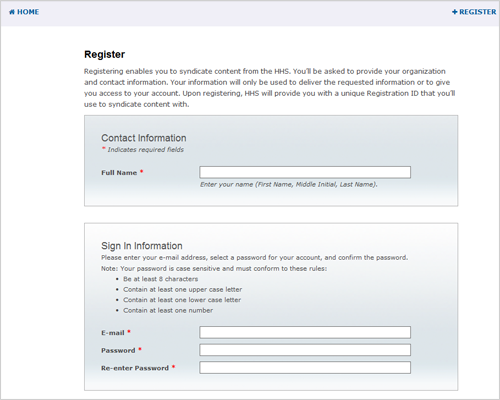
    Example of a registration page with fields for entering name, email, and password.
  3. Sign In
    After you have created your account, the storefront will prompt you to SIGN IN with your email and new password.
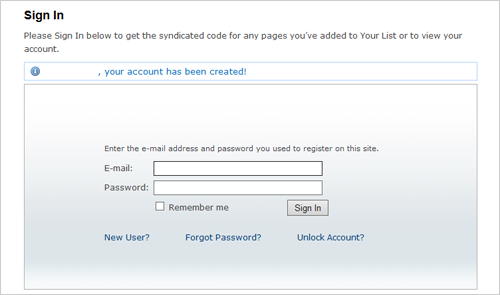
    Example of a sign in page displaying fields for entering email and password.
  4. Create a List(s)
    This step is optional but highly recommended to help you stay organized when using the storefront. Select LISTS from the menu at the top right of the page.

    Example of the navigation menu where users can select lists.
    Select CREATE LIST then add the Name and Description for your list. You can create as many lists as you need to help you stay organized. You’ll be adding pages to these lists for use now and/or in the future.
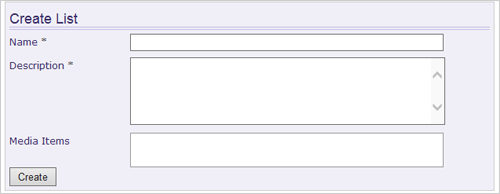
    Example of the create list page for entering the name of a new list, description and media items.
  5. Search for health and research information
    Begin searching for content by topics you are looking for that relate to your website. You have the option to use the Advanced Search to narrow your search results.
    Example of a page displaying the search box where topics can be entered.
  6. View information you might want for your website
    To review what’s on a particular page, select the title of the page.
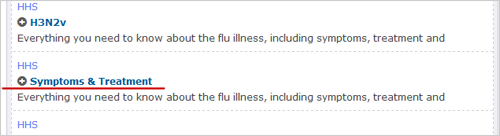
    Example of the search results displaying page names.
    More information about the page is displayed.
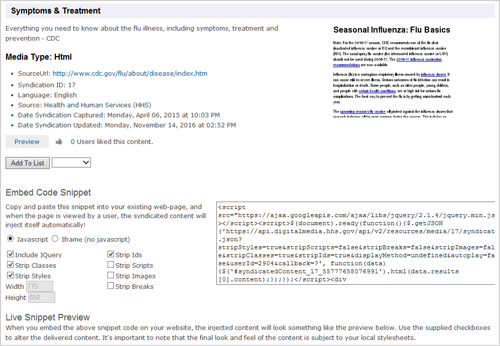
    Example of a page displaying the media type, code, and preview of content for the topic page selected.
  7. Select pages
    If you want a page for your website, or want to save it for later, select ADD TO LIST.
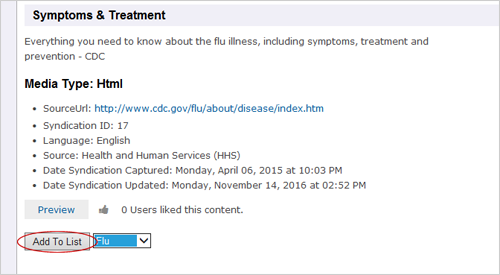
    Example of a page displaying button “Add to List” that saves a page to their list.
  8. Copy and paste the code
    You will see a page with all the information you need to post material on your website. You (or your website developer) can copy the code with or without jQuery depending on what your website uses. Simply paste the code into the section of your website where you would like the information to appear.
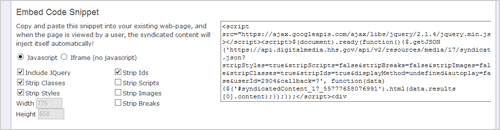
    Example of a page displaying the code that gets placed into your website.
    To find pages you saved for later:

    If you've selected pages and added them to a list, you can find them by clicking LISTS at the top of the page. Click the name of the list you want. Then you’ll see your pages under the section titled Media Items. Once you see the items you chose you can return to those pages for information or to get the code.
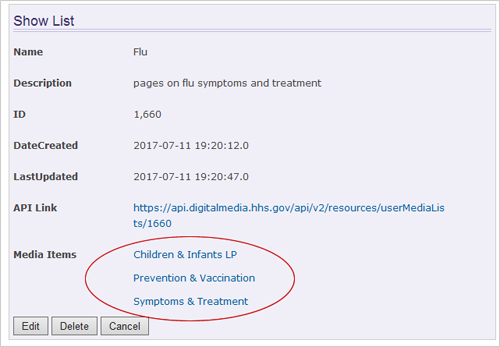
    Example of a page displaying the names of pages already saved in your list.
    Congratulations, you’ve done it! The information will appear immediately. And, it will be updated automatically when we have new scientific evidence on that topic. You don’t need to do another thing, though we would appreciate your feedback on how it’s working for you.

    If you need help or have feedback to share, contact Syndication@hhs.gov.
Content last reviewed September 19, 2022
Back to top
Secretary Robert F. Kennedy Jr.

Follow @SecKennedy

HHS icon

Follow @HHSGov

HHS Email updates

Receive email updates from HHS.

Subscribe

HHS Logo

HHS Headquarters

200 Independence Avenue, S.W.
Washington, D.C. 20201
Toll Free Call Center: 1-877-696-6775​

  • Contact HHS
  • Careers
  • HHS FAQs
  • Nondiscrimination Notice
  • Press Room
  • HHS Archive
  • Accessibility Statement
  • Budget/Performance
  • Inspector General
  • Web Site Disclaimers
  • EEO/No Fear Act
  • FOIA
  • The White House
  • USA.gov
  • Vulnerability Disclosure Policy